Lumen Ring Chart
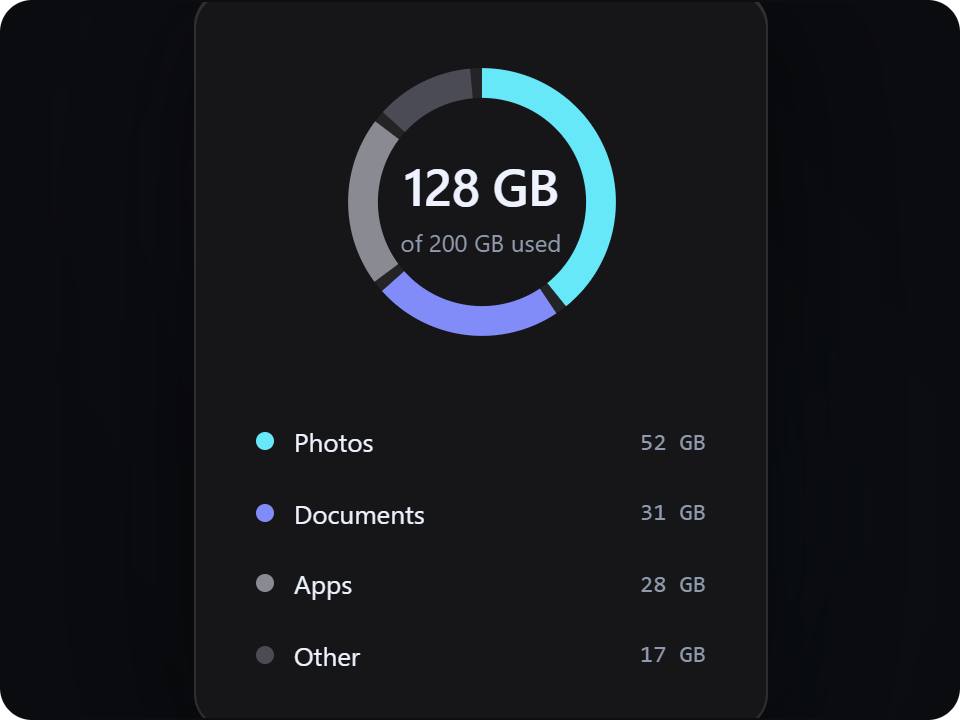
gradientA storage ring with a clear center value and segmented legend.
How it works
3 stepsPreview
See the authored component running live.
Customize
Open the playground to tune its controls.
Ship
Copy the TypeScript source and install what it needs.
Runtime package
Install the requirements
No external package required.
This product runs from its authored browser renderer and does not need a package install step.
Product contract
- Renderer
- css
- Version
- Not published
- Preview
- live
- Controls
- 0 authored controls
- Source
- lumen-ring-chart
Usage
Use the authored product, not a screenshot
This product is rendered from its authored design definition. The preview and the React + TypeScript code stay aligned with the same source values.
Stored product brief
A dark abstract gradient interactive design: A storage ring with a clear center value and segmented legend.
Source integrity
Traceable back to the registry
Registry source
lumen-ring-chart
Public slug
lumen-ring-chart
Renderer
css
Published version
Not published
Playground
Code, API, and integration
import type { CSSProperties } from "react";

const css = ".dp-lumen-ring-chart-asset{position:relative;display:grid;place-items:center;padding:0px;opacity:1.00;transform:translate(0px,0px) perspective(900px) rotateX(0deg) rotateZ(0deg);transform-style:preserve-3d;filter:contrast(1.00) saturate(1.00) hue-rotate(0deg) blur(0.00px) drop-shadow(0 14px 48px rgba(0,0,0,.42));transition:transform .45s cubic-bezier(.2,.8,.2,1),filter .45s ease,opacity .35s ease;will-change:transform,filter,opacity;}\n.dp-lumen-ring-chart-asset::before{content:\"\";position:absolute;inset:0px;border-radius:25px;background:radial-gradient(circle at 35% 25%,#818cf852,transparent 42%),radial-gradient(circle at 66% 72%,#22d3ee4d,transparent 50%);filter:blur(53px);opacity:0.26;z-index:-1;pointer-events:none;}\n.dp-lumen-ring-chart-asset::after{content:\"\";position:absolute;inset:0px;border-radius:25px;border:0px solid rgba(255,255,255,.12);box-shadow:inset 0 1px 0 rgba(255,255,255,.14);opacity:0;pointer-events:none;}\n.dp-lumen-ring-chart-stage{--a:#67e8f9;--b:#818cf8;--deep:#082f49;--ink:#eef2ff;--muted:#8f9aad;position:relative;display:grid;place-items:center;width:287px;min-height:208px;color:var(--ink);font-family:ui-sans-serif,system-ui,sans-serif;}.dp-lumen-ring-chart-surface{position:relative;width:100%;min-height:100%;border:1px solid rgba(255,255,255,.1);border-radius:18px;background:rgba(17,19,25,.9);box-shadow:0 10px 46px rgba(0,0,0,.32),inset 0 1px 0 rgba(255,255,255,.1);overflow:hidden;}.dp-lumen-ring-chart-eyebrow{font:600 9px/1 ui-monospace,SFMono-Regular,monospace;letter-spacing:.16em;text-transform:uppercase;color:var(--muted);}.dp-lumen-ring-chart-title{margin:0;font-size:18px;line-height:1.1;letter-spacing:-.04em;}.dp-lumen-ring-chart-copy{margin:0;color:var(--muted);font-size:11px;line-height:1.55;}.dp-lumen-ring-chart-button{border:1px solid rgba(255,255,255,.14);border-radius:9px;background:rgba(255,255,255,.08);color:var(--ink);font:600 10px ui-monospace,SFMono-Regular,monospace;padding:9px 11px;}.dp-lumen-ring-chart-button:hover{background:rgba(255,255,255,.14);}.dp-lumen-ring-chart-still *{animation-play-state:paused!important;}.dp-lumen-ring-chart-ring{display:flex;flex-direction:column;align-items:center;gap:18px;min-height:201px;padding:20px;box-sizing:border-box;background:#161618;}.dp-lumen-ring-chart-donut{position:relative;width:170px;height:170px;flex:none;}.dp-lumen-ring-chart-donut svg{width:100%;height:100%;transform:rotate(-90deg);overflow:visible;}.dp-lumen-ring-chart-track{fill:none;stroke:rgba(255,255,255,.06);stroke-width:14;}.dp-lumen-ring-chart-segment{fill:none;stroke-width:14;transition:stroke-width .3s cubic-bezier(.3,1.5,.5,1),opacity .3s;}.dp-lumen-ring-chart-segment.hl{stroke-width:19;}.dp-lumen-ring-chart-ring.dim .dp-lumen-ring-chart-segment:not(.hl){opacity:.28;}.dp-lumen-ring-chart-segment:hover{stroke-width:19;}.dp-lumen-ring-chart-donut-center{position:absolute;inset:0;display:grid;place-content:center;text-align:center;pointer-events:none;}.dp-lumen-ring-chart-donut-center b{font-size:26px;font-weight:600;letter-spacing:-.02em;}.dp-lumen-ring-chart-donut-center span{font-size:12px;color:var(--muted);}.dp-lumen-ring-chart-legend{width:100%;display:flex;flex-direction:column;gap:2px;color:var(--ink);}.dp-lumen-ring-chart-legend div{display:flex;align-items:center;gap:10px;padding:7px 10px;border-radius:10px;font-size:13px;}.dp-lumen-ring-chart-legend div:hover,.dp-lumen-ring-chart-legend div.hl{background:rgba(255,255,255,.06);}.dp-lumen-ring-chart-legend i{width:9px;height:9px;border-radius:50%;flex:none;}.dp-lumen-ring-chart-legend b{margin-left:auto;font:500 12px ui-monospace,monospace;font-style:normal;color:var(--muted);}";
const markup = "<div class=\"dp-lumen-ring-chart-asset\"><article class=\"dp-lumen-ring-chart-stage dp-lumen-ring-chart-still\"><div class=\"dp-lumen-ring-chart-surface dp-lumen-ring-chart-ring\"><div class=\"dp-lumen-ring-chart-donut\"><svg viewBox=\"0 0 160 160\" aria-hidden=\"true\"><circle class=\"dp-lumen-ring-chart-track\" cx=\"80\" cy=\"80\" r=\"56\"/><circle class=\"dp-lumen-ring-chart-segment\" cx=\"80\" cy=\"80\" r=\"56\" stroke=\"#67e8f9\" stroke-dasharray=\"137.94 351.86\" stroke-dashoffset=\"0.00\"/><circle class=\"dp-lumen-ring-chart-segment\" cx=\"80\" cy=\"80\" r=\"56\" stroke=\"#818cf8\" stroke-dasharray=\"80.22 351.86\" stroke-dashoffset=\"-142.94\"/><circle class=\"dp-lumen-ring-chart-segment\" cx=\"80\" cy=\"80\" r=\"56\" stroke=\"#8a8a93\" stroke-dasharray=\"71.97 351.86\" stroke-dashoffset=\"-228.16\"/><circle class=\"dp-lumen-ring-chart-segment\" cx=\"80\" cy=\"80\" r=\"56\" stroke=\"#4b4b55\" stroke-dasharray=\"41.73 351.86\" stroke-dashoffset=\"-305.13\"/></svg><div class=\"dp-lumen-ring-chart-donut-center\"><b>128 GB</b><span>of 200 GB used</span></div></div><div class=\"dp-lumen-ring-chart-legend\"><div><i style=\"background:#67e8f9\"></i>Photos<b>52 GB</b></div><div><i style=\"background:#818cf8\"></i>Documents<b>31 GB</b></div><div><i style=\"background:#8a8a93\"></i>Apps<b>28 GB</b></div><div><i style=\"background:#4b4b55\"></i>Other<b>17 GB</b></div></div></div></article></div>";

const stage: CSSProperties = {
  boxSizing: "border-box",
  width: "100%",
  minHeight: "360px",
  display: "grid",
  alignItems: "center",
  justifyContent: "center",
  padding: "48px 24px",
  overflow: "hidden",
  borderRadius: 28,
  background: "#0b0c10",
};

export function LumenRingChart() {
  return (
    <div
      style={stage}
      dangerouslySetInnerHTML={{ __html: "<style>" + css + "</style>" + markup }}
    />
  );
}
Related