Liquid Glass Pill
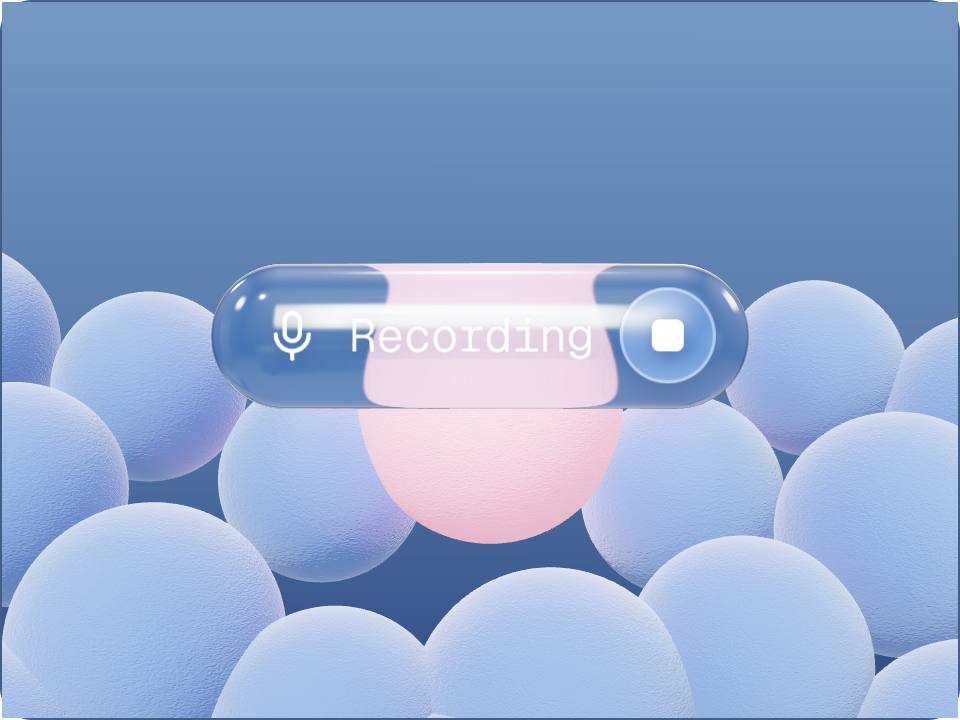
3dA glass capsule floating in a soft blue studio that stretches toward the cursor like a droplet, thins as it reaches, and squashes when pressed.
How it works
3 stepsPreview
See the authored component running live.
Customize
Open the playground to tune its controls.
Ship
Copy the TypeScript source and install what it needs.
Runtime package
Install the requirements
These are the real runtime dependencies declared for this renderer. The product itself is not presented as a package until a published package exists.
npm install three^0.185.1 @react-three/fiber^9.7.0Product contract
- Renderer
- threejs
- Version
- Not published
- Preview
- live
- Controls
- 0 authored controls
- Source
- liquid-glass-pill
Usage
Use the authored product, not a screenshot
This product is rendered as a live Three.js scene. The preview and exported source are driven by the same repository definition and renderer contract.
Stored product brief
A liquid glass pill: a real capsule mesh rendered with a physical transmission material so it refracts the fuzzy blue spheres behind it. The liquid behaviour is a vertex deformation that stretches the capsule along the direction of the cursor, thins the neck as it stretches, and ripples with the spring velocity. A DOM overlay carrying an icon, a label and a stop button is projected onto the pill every frame so the text stays crisp.
Source integrity
Traceable back to the registry
Registry source
liquid-glass-pill
Public slug
liquid-glass-pill
Renderer
threejs
Published version
Not published
Playground
Code, API, and integration
import { Canvas, useFrame } from "@react-three/fiber";
import { useRef } from "react";
import type { Group } from "three";

// Liquid Glass Pill — SceneUI 3D export (React Three Fiber)
function Rig({ children }: { children: React.ReactNode }) {
  const ref = useRef<Group>(null);
  useFrame((_, delta) => {
    if (ref.current) ref.current.rotation.y += delta * 0.45 * 1;
  });
  return <group ref={ref} scale={1.000}>{children}</group>;
}

export function LiquidGlassPill() {
  return (
    <Canvas dpr={[1, 1.5]} camera={{ position: [0, 0, 4], fov: 45 }} style={{ background: "#4a6d9c" }}>
      <ambientLight intensity={0.35} />
      <pointLight position={[3, 3, 3]} intensity={7.8} color="#7399c4" />
      <pointLight position={[-3, -2, -2]} intensity={4.4} color="#2d4a82" />
      <Rig>
        {/* Paste the matching JSX for this design from the playground renderer,
            or open it in the editor and copy the live scene. */}
      </Rig>
    </Canvas>
  );
}
Related